If you’re a farmers market or pop-up market manager, booth assignment day probably looks something like this:
A color-coded spreadsheet. A handful of sticky notes. A Canva map you’ve rebuilt three times. And somehow — despite all that effort — you still end up with two competing food vendors back-to-back and a vendor texting you at 7am asking where to set up.
Sound familiar?
You’re not disorganized. You’re under-tooled.
The average market manager spends 30+ hours per season manually assigning vendor booths. That’s time spent cross-referencing spreadsheets, emailing individual vendors, and fixing mistakes that should never have happened in the first place.
There’s a better way. This post walks you through exactly how modern farmers market booth assignment software — specifically Hivey — eliminates the chaos and gets your market layout done right the first time.
Why Vendor Booth Assignment Is Harder Than It Looks
On the surface, assigning booths sounds simple: you have vendors, you have spaces, you match them up.
But any experienced market manager knows the reality is far messier.
You’re not just filling spots. You’re managing market flow, making sure similar vendor categories are spread out, that high-performing vendors are placed where they’ll thrive, and that your layout makes sense for how shoppers actually move through your market.
Do it wrong and you hurt vendor sales. Do it manually and you waste days of your life.
Here’s what the manual process typically costs you:
- Time: Hours of cross-referencing vendor applications, categories, and your map
- Errors: Duplicate categories placed side-by-side because you lost track in the spreadsheet
- Communication lag: Vendors who don’t know their booth until the day before — or day of
- Day-of chaos: Last-minute changes that require you to manually text or email every affected vendor while you’re trying to run a market
The problem isn’t you. The problem is that spreadsheets were never built for this.
The Smarter Way to Assign Vendor Booths: The Hivey Method
Hivey is a market management platform built specifically for farmers market and pop-up market organizers. Its booth assignment feature removes every manual step from the process — and replaces it with a system that’s faster, smarter, and actually scales.
Here’s how it works.
Step 1: Filter by Category Before You Place a Single Vendor
Before you assign anyone to a booth, you need to see what you’re working with.
In Hivey, once vendors are approved, you can filter your entire vendor list by category — food, art, jewelry, plants, and whatever categories matter to your market — before a single person lands on your map.
This means you can see at a glance: how many food vendors do you have? How many artisans? Are you heavy in one area? Where do you have gaps?
You’re making informed decisions from the start — not discovering a problem after your map is already half-built.
Step 2: Drag and Drop Vendors Directly Onto Your Map
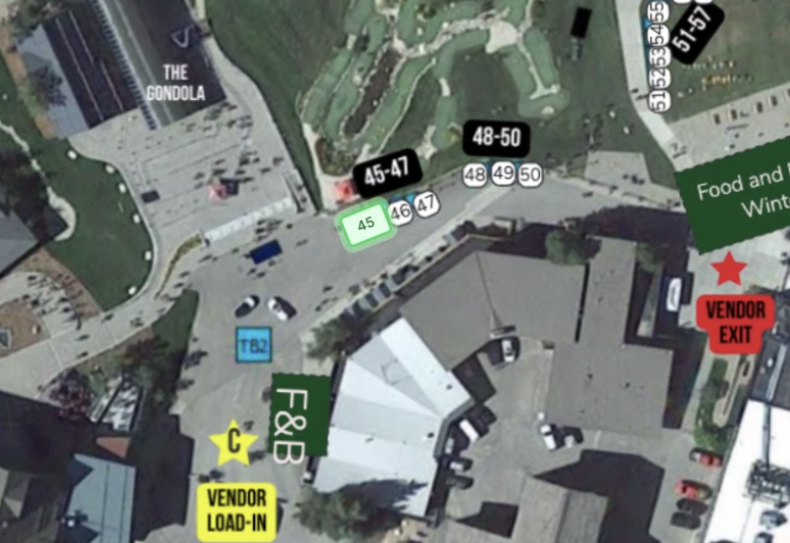
Once you know what you’re working with, placement is simple: drag vendors from your approved list directly onto your booth map.
As you place each vendor, Hivey shows you their category — so you’re always making intentional, strategic decisions about layout and market flow.
Accidentally about to place three jewelry vendors in a row? You’ll catch it before it happens.
Want to sprinkle similar categories throughout the market instead of clustering them? Filter, space, and place — in minutes, not hours.
No spreadsheet. No sticky notes. No second-guessing.
Step 3: Publish, and Vendors Are Notified Automatically
This is where Hivey becomes a genuine game-changer.
The moment you publish your booth assignments, every vendor receives an automatic email notification with two things:
- Their booth number
- A photo of your market map with their specific booth highlighted in green
They know exactly where they’re going before they ever pull into the parking lot. No “where do I set up?” texts. No confused vendors blocking the entrance while they figure it out.
One click on your end. Zero manual communication on your end.
Step 4: Make Changes. Vendors Update Automatically
Here’s the part that matters most on market day.
Vendors drop out. No-shows happen. Layouts shift. And when they do, the old way means manually updating your map, then manually notifying every affected vendor — usually while you’re already trying to set up the market.
With Hivey, when you move a vendor on the map, the affected vendor is automatically notified of the change — and their map updates in real time, both in their email and on their vendor dashboard.
This even works on-site, day-of. If a vendor doesn’t show and you need to reassign their booth, you can do it from your phone. The new vendor gets notified instantly. Their map reflects the change immediately.
No frantic texts. No scrambling. No spreadsheet edits at 6am in a parking lot.
What This Looks Like in Real Life
“Ya’ll either did your homework and spoke to folks operating farmers markets, or you are extremely lucky.” — Real Hivey Market Manager
That quote says everything.
Hivey wasn’t built by people who guessed at what market managers need. It was built around the real, messy, day-of reality of running a market — and the booth assignment feature is one of the clearest examples of that (our CEO is a vendor coordinator himself).
Market managers using Hivey report cutting booth assignment time from 30+ hours to under 60 minutes, with fewer errors, happier vendors, and better market flow.
Farmers Market Booth Assignment Software (Hivey) vs. Spreadsheets: A Quick Comparison
| Spreadsheets + Canva | Hivey |
Category filtering | Manual, error-prone | Built-in, one click |
Vendor placement | Copy/paste or sticky notes | Drag and drop |
Vendor notification | Manual email per vendor | Automatic on publish |
Map sent to vendors | You build it separately | Included automatically |
Day-of changes | Manual texts/emails | Auto-notified instantly |
Time to complete | 30+ hours | Under 60 minutes |
Who This Is For
Hivey’s booth assignment feature is built for:
- Farmers market managers running weekly or seasonal markets with several vendors
- Pop-up market hosts managing one-time or rotating events with complex layouts
- Market organizers who are done rebuilding their Canva map every time a vendor drops out
If you’re currently managing booth assignments in a spreadsheet, a shared Google Doc, or — bless your heart — paper forms, this was built for you.
Ready to Stop Doing This the Hard Way?
Booth assignments don’t have to take your entire weekend. They don’t have to mean a flood of vendor questions the morning of your market. And they definitely don’t have to live in a spreadsheet you’re terrified to accidentally close without saving.
Book a free Hivey demo and see exactly how the booth assignment flow works, including the drag-and-drop map, automatic vendor notifications, and day-of update tools.